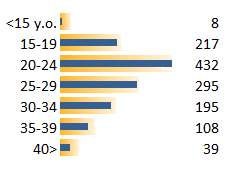
 Excel 2007 is useless. This was a shocking revelation when I tried to create the charts for last post (Chart Design: Abortion Ratios 1980-2003).
It was my first serious attempt at using Excel 2007. I failed miserably and gave up. I had to do everything in Excel 2003 and then open the file in Excel 2007 for some polishing.
I new there was some senseless options in conditional formatting (actually, it is worse than I expected, as you can see on the left chart). And Stephen Few said everything I needed to know about Excel 2007 new chart engine. And, by that time, Microsoft bought Dundas. Isn’t that enough to raise some red flags?
But I had to see it for myself. I will not talk about the ribbon. I keep it hidden, so it really doesn’t bother me. And having to learn a new interface is something that I don’t mind – let’s call it brain workout.
There are several small but frustrating things, like trying to select multiple charts as objects, but what really pissed me off was that empty macro I got, after recording some chart formatting. I couldn’t believe it and tried several times, before googling for this “error”. It isn’t one (you can compare both versions here and get more bad news, as I did).
I suspect that this is just the tip of the iceberg. And it is not the major changes in features or the new user interface. It is the small things, left behind just to annoy you.
Bottom line: stay with Excel 2003. Charts in Excel 2007 look much better due to the new rendering engine, but do you really want to buy Office 2007 just to polish some charts?
Please share your thoughts in the comments. I’d like to know if (and how) you can do productive work with Excel 2007.
I was with you a few months ago, when I first started using 2007, but actually some of the features are good. The Ribbon is more efficient once you get used to it and know where stuff is. The ability to select different data series while you have the format dialog boxes open is great.
For the most part though the functionality is just ‘lipstick on the pig’. I use mostly keyboard shortcuts, and the underlying interface is pretty much the same as 2003 for most things. Seems like they just moved toolbars around.
I don’t use Excel 2007 for real work, though I’ve done a fair amount of programming in 2007 for clients who “up”graded from 2003. Most of the programming has been designing ribbon-based interfaces to replace the custom menu/toolbar interfaces they’ve used for generations.
I disagree that “Charts in Excel 2007 look much better due to the new rendering engine”. The rendering engine provides lots of new special effects: transparency, shadows, gradients, funky font formatting. Big deal. It means it’s easier than ever to pile on the chart junk. The defaults are maybe a little better than in 2003, but I’ve never used the defaults. I think the 2007 charts don’t look as crisp, and it’s more of a pain to work with them with the new ribbon and dialogs. Exported 2007 charts in PowerPoint and Word don’t look as good as before, either.
I covered a lot of the changes in Excel 2007’s charts in Changes to Charting in Excel 2007.
Jorge, I’ve got to disagree. I made the transition a year ago and could not think of going back. The macro recorder complaint is valid, and I agree that most of the default conditional formatting options are useless. My biggest complaint about 2007 is the sort dialog.
These are the features that leave 2003 in the dust: 1 million rows, IFERROR, SUMIFS, COUNTIFS, Tables, reduced file size, improved autofilter, increased maximum formula length, and increased capacity of Pivot Tables.
@Chuck: When using Excel 2007 I keep getting that “beta” (or even “alpha”) feeling of something that is not quite finished, and that’s very annoying because I can’t concentrate on the work. And yes, there is much “lipstick on the pig”.
@Jon: given the option of creating an image of exactly the same chart (to add to a post here, for instance), I would rather do it in Excel 2007 (and you agree that “the default Excel charts look much nicer than in earlier versions” – from the link). This is not enough to upgrade, of course.
@Jonah: this is a depressing release from a visualization point of view. There are some “nice to have” new features, but the macro issue is a mortal sin.
Hi, all in all I am disappointed by the changes in Excel 2007. I felt dazzled and disoriented by all the new options which overall made it more difficult to do basic tasks. I admit to having trouble understanding notions like bevel and shadow.
Conditionnal formatting is another matter. The options do make sense in good hands, else it’s just gratuitous fluff. but when used well it can be impressive and useful.
The paper by Stephan Few made me wonder. AFAIK, he is the leading authority on excel-type graphs. I’m quite surprised he emails suggestions to a guy who doesn’t appear to run the show, just like a beta-tester. If I was MS, and got an email from him, I would hire him instead and make sure people listen to him. By comparison, MS regularly picks the mind of presentation gurus like Garr Reynolds to make ppt better. (which is a more daunting task than fixing excel charts…:) )
I absolutely agree with all the criticism about the new chart engine. However, I think the Microsoft UX Team did a very good job introducing the Ribbon as a new UI paradigm. You simply can’t avoid a new UI for feature rich applications like Microsoft Office 2007.
However, the pain point of the 1st version of the Ribbon is the themed Ribbon with all the glow effects, effects of light, stuff you should avoid in Data Visualization (and Effective User Interfaces).
I tried to apply Effective Chart Design Rules and redesigned the Ribbon on
http://blog.xlcubed.com/microsoft-pimp-down-my-ribbon/
I hope this will be addressed this with Office 14 !
Andreas
Jorge – I agree about the “beta” feel to Office 2007.
Chuck – At first the modeless dialogs seem like a good idea, because you can format one series, select another, and format it in turn, without dismissing the dialog. However, the downside of the modeless dialog is one of the most productivity-robbing aspects of Excel 2007. In 2003, I could format a series, dismiss the dialog, select another series, press the F4 key, and repeat all formatting from the previous trip to the dialog. Then select another series and press F4, then another and another. In Excel 2007, the F4 functionality has been eviscerated, and instead of click+F4 to repeat a whole set of formatting options, I have to actually repeat manually each option, one by one. I would gladly give back the modeless dialogs, plus the three (wow!) new worksheet functions, plus half of the new table features (Excel 2003’s Lists were nearly as powerful), in order to reclaim my F4 key.
To clarify, you asked how you can do productive work with 2007. The impact comes from using the new features in combination. For example:
Sumifs on Tables lets me summarize data that may be too large for 2003, or too conditional or multidimensional for Getpivotdata. The Table replaces writing a Dynamic Range. Sumifs replace very slow calculating Array Formulas. IntelliSense lets me write faster and with fewer errors. 2007 enabled previously impossible aspects of my work, and made all other areas more productive.
Jon, have you benefited from saving a chart as a template for reuse?
For large data, I’ve found that Excel 2007 bogs down worse than 2003, especially if you try charting it. In either version, it’s often better to use DB queries to extract relevant records from an external database. I’m not an expert on this, it’s harder than using the worksheet, and most of my data is at most a few thousand records.
The 2003 List replaces dynamic ranges, but like 2007’s Table, it only replaces the most rudimentary dynamic ranges. The 2007 Tables have a counterintuitive relative referencing system, and if you need absolute referencing, you’re stuck with using cell addresses as in 2003.
The formula intellisense is very nice, but 2003 had the rudiments of this. Chart templates are more flexible and reliable than the old user types (I was always corrupting my user galleries).
Nothing in my day-to-day activities is made any easier in 2007 than in 2003, and in fact most tasks are much more difficult or tedious in 2007. Have you never used the F4 (Repeat Last Action) key in Excel? They’ve hobbled it in 2007.
I use MSQuery in almost all of my 2007 workbooks to return a Table. Even if the query sums data, the result is often very large (10k-200k rows). Sumifs on the resulting Table make it easy to write a formula like: sum sales for products with SKUs that begin with EXC*, purchased between 1/1/08 – 6/1/08 but not on 2/29/08, where the order purchase price was >= $100. You can easily parameterize the query itself, or parameterize conditions in the Sumifs.
Though an edge case, my last year has been incredibly productive because of 2007.
I was unaware of F4 in 2003 and am disappointed to learn I won’t have the chance to use it in 2007. Combine that with a macro recorder that doesn’t work on charts and I certainly understand your disappointment.
@Jerome: Like some other ideas the conditional format is great, but very poorly implemented. Just create a chart similar to the one above and you’ll see that the bars of the conditional formatted cells do not match with the bars in a regular chart. Well, in fact, it is hard to tell, because you really don’t know where the bars end…
@ Andreas: I hate the ribbon because of a simple reason: it clutters my screen and distracts me from what I’m doing. My Windows task bar is often in auto-hide mode and I like to work in full-screen mode. “Minimize the ribbon” is one of the coolest things in Excel 2007…
@ Jonah: I’m working on a new project and soon I’ll be exposed to other areas of Excel 2007 I didn’t explore until now. I couldn’t be productive with a very simple task, and I’m afraid of what lays ahead, but I’ll try to be open-minded and do my best to see what is a natural learning curve and what is not.
A nice feature in a dashboard I’m working on is the visual what-if (the user moves a data point in a chart to test scenarios). That is something you can’t do in Excel 2007.
@Jonah: Some users are find Excel 2007 great, depending on the set of functions/features they use on a daily basis. As Stephen Few said, the new chart engine is a lost opportunity. Not being able to record chart formats is plain stupid (I know, there must be some compatibility issues with the current VBA version, but I still think is plain stupid). The new functions may be nice, but I always find a way to sumif the data the way I want.
The macro recorder shortcomings relate to the new shapes implemented in 2007. Since the chart uses these new shapes for its elements, any formatting is not recorded. I do not think there are incompatibilities with VBA, since you can access the new shapes through the VBA object model. Not easily, because the help content has gotten less helpful than ever before. My suspicion is that Microsoft simply did not have time to add this functionality to the macro recorder.
Since I don’t use any of the special new chart junk formatting in 2007, I simply record what I need in 2003 (I still have versions 2000-2003 on one computer, and I can fire up 97 if needed), and paste it into 2007.
Jonah –
“Though an edge case, my last year has been incredibly productive because of 2007.”
So you’re the guy, ha ha.
Interesting to read how “chart professional experts” react to Excel. There is something though I do not understand in your complaints : OK you cannot record the chart in VBA, but there is a very useful possibility in Excel 2007 to define your own templates, which I use a lot to apply to all my charts the same design right when I create them. I find this really useful, and is for me one of the main reasons I decided to use Excel 2007 (the ribbon really being the main reason)… I only have to twick the axes scales, et voilà !
Paul – In 2003 you could define your own custom types. It wasn’t implemented as elegantly or flexibly as in 2007, but it worked reasonably well. For me the chart templates are a plus 1, while the broken macro recorder is a minus 2 on the same scale, the decreased efficiency I have with the ribbon is a minus 2, and the loss of F4 functionality is minus 10.
This is a piece of garbage!
Here is the link where Mirosoft admits they are complete idiots
http://support.microsoft.com/kb/937620
Brady, thanks for the link. I specially liked the Status (“This behavior is by design.”).
This statement makes a lot of sense – NOT:
“In Excel 2007, the new ChartFormat object provides access to OfficeArt formatting for chart elements. However, the properties of the ChartFormat object are read-only. Therefore, they cannot be recorded.”
I have spent hours trying to figure out the whole deal with ChartFormat. ChartFormat itself is read-only, but its properties are writable (or else how would you change them?). However, the online help was not really fleshed out for this object and its members, and it’s also poorly connected to the VBA object browser.
My consolation is that all of the ChartFormat stuff makes up the craptastic effects that should be discouraged anyway. The code that works in 2003 is sufficient to make un-junky charts in 2007.
By changing charts in Excel 2007, Microsoft broke more than it fixed.
In the first release, before Service Pack 1, names defined on the worksheet referring to ranges couldn’t be used in series. Excel couldn’t resolve them properly.
There seem to be lots of off-by-one errors too, which programmers will instantly spot. The most glaring is the horizontal X axis line/plot-area border, which has a kink in it. The anti-aliasing makes it stand out even more. See:
Jorge,
I run the heck out of excel as a substantial analytical tool in my practice. Dating back to the visicalc, lotus and Symphony, I can say with some credibility 2007 is a blunder. I have to agree, there are no substantive improvements in function or productivity, but 2007 accross the board adds a very unproductive user interface (the only way to fix it is to recreate the interface by ratically customizing the menu bar), a definite reduction in power due to the new memory allocation scheme and a discovered fatal incompatibility with Microsoft SQLServer 2005. Excel 2007 is a dog; with charting, the shapes formating is squirley/non-professional, the copy/paste/reference function across spreadsheets is totally screwed up and in general just a bad program, stay with 2003.
Walter –
I’m glad to hear from other knowledgeable users who share my opinion. I will point out that to “fix” the user interface requires not only heavy alteration of the ribbon, but also recreation of dialogs which worked nicely in 2003 and which are massively inefficient in 2007. I’m in the process of constructing a set of these dialogs, but it’s a huge task.
Excel 2007 is awful. The ribbon is difficult and unnecessarily clutters up the interface. Excel 2007 crashes more with large data sets and I think it was designed for people making home budgets and simple lists. Think about MS’s last few products — Vista — somewhere between terrible and okay, Internet Explorer — tired and bloated, Office 07 — ineffective…
I’ve moved to Excel 2007 about two months ago, and consider it a HUGE step down from 2003, specifically from the following two perspectives:
1) With the Ribbon, you have to click at least twice for a lot of functions that you had accessible on customized toolbars in 2003. Adding everything in one line in the Quick Access toolbar is not as good as the old toolbars.
2) The new charts: everybody complains so far about a) the look (which is imo a matter of taste), as well as the recording issue (a BIG disadvantage, which affects productivity and output negatively). I have one other MAJOR gripe: the performance / speed. I have a single-core PC running XP Pro with 1 GB RAM. If you have several charts with many data points on them, and make a change to any of the data values, Excel takes AGES to update the charts, while it becomes completely unresopnsive. The same charts in Excel 2003 would update almost instantaneous.
In terms of productivity and output from someone who uses Excel extensively, I have to give 2007 a BIG thumbs-down.
It seems as if you can’t select a discontiguous range of cells using Ctrl-drag. This means that you can’t plot them in a chart – which is disastrous!
I have compared the behaviour of Excel 2003 and 2007 and find that the Ctrl-drag method which works in 2003 doesn’t work in 2007. Surely there must be a way to plot discontiguous data?
Helen
Helen –
You’ve posted this statement somewhere else recently, and I pointed out that it’s not true. Select an area, hold Ctrl, and select each additional area.
I would like to hear the details of your comparison. Excel 2007’s charting functionality has certainly been reduced from Excel 2003’s, but this is not a specific issue I have had any problem with.
As in previous versions of Excel, your multiple selection must meet some requirements:
1. You must be able to collapse the different areas into a single contiguous area by deleting entire unselected rows and columns passing between selected areas.
2. Junctions between ranges must be continuous (If you select B1:B4 and B5:B8, then selecting C1:C8 as a single area or C1:C3 and C4:C8 as a multiple area violates this requirement).
3. No cells may be selected more than once.
Jon, thanks for clarifying this.
Excel 2007 is evil! I been copy-pasting charts from excel 2003 to another program for several with no problems. I am just confident that they will stay perfect when pasted. But excel 2007 just give me hard time. You need to copy-paste special just to retain the vector/scalable/wmf/emf image format. And it just gotten worst when I tried to copy a 3d-chart…. some text and lines are okay but the graph is rasterized. Tsk tsk tsk… bad.. bad.. bad….
Still can’t figure out – is there a way to make change the transparency for a single Point (not the whole series) in a bar chart?
@Owen: sure: select the data point instead of the whole series, right-click and choose Format Data Point.
I’m working in a mixed environment of XP and 07 users, and this morning, someone called me to say that an 07 chart sent to an XP user looked different when opened on the XP box. I opened the e-mail on an XP machine and an 07, and found that all the text boxes and lines on top of the chart were in the wrong places. I would’ve assumed some graphical infidelity, but not wholesale shifting of objects. That just sucks! Other than telling people to stick with XP for charts until everyone’s on 07, does anyone have a solution for preventing this other than sending .pdf’s of the charts to the XP users?
Greg –
I feel your pain. There are so many strange and wonderful differences between 2007 and stable old classic Excel. Excel versions 2000 through 2003 are 99% interchangeable, and the ways that they are not do not completely spoil your work.
I’ve had th change my project estimation practices. When quoting a job in Excel 2000-2003, I make a quick guestimate in my head, and double it. I’ve realized that for a job in Excel 2007, I need to double it again, or it won’t nearly cover my time.
I got tied up today when adding a shape to a worksheet in 2007. In 2003, when you add a shape to the active sheet, that shape is logically referenced as
ActiveSheet.Shapes(ActiveSheet.Shapes.Count)
Not so in 2007. If there are shapes left over from 2003 in a legacy workbook, the shapes are segregated in the stacking order by version that created the shapes. In addition, forms controls are segregated with the 2003 shapes, even if they are inserted using 2007.
I just had my first taste of MS-Excel 2007 and my first thought is “they broke it”. I regularly work with Pivot Tables and Pivot Charts in MS-Excel 2003, and often need to work with data sets over 65535 lines. So far, my method has me importing the large datasets (sometimes over a million lines) into MS-ACCESS, and then from there using that as the source of data in the MS-EXCEL pivot table…it works well, my is a lot of extra clicks…I was excited to hear that 2007 didn’t have this limitation and figured I could import the large CSVs directly into Excel 2007. First problem I encountered, is that it imported the CSV data into a single column instead of splitting it based on the Commas….needed to use the Text to columns dialog to get it to split….probably a setting somewhere, but will most likely take me 30 minutes to figure it out. That’s 30 extra minutes I could be doing something else.
Next I bring up the PivotTable/Pivot charts and it is totally messed up. From simple Drag to the correct place on the table or chart in Excel 2003 the have regressed to an awful interface….reminds me of office in the 1990’s.
Needless to day I plan on living with MS-OFFICE 2003 for a looonnngggg time.
Has anyone run in to any problems with saving a workbook created in Excel 2007, with charts and worksheets, to 2003? I’ve saved many files back to XLS/2003 that I’ve created in 2007 without an issue. On this most recent file I created, Excel 2007 crashes every time that I do a Save As / 97-03. Also, the file cannot be opened by colleagues that have the Office 2007 converter tool. However, others with Excel 2007 have no problem opening my file. Any ideas?
Thanks!
Tim
All,
I have two recurring issues with Excel 2007. The first is that several of my chart names (on the tab) were converted to default names such as “chart1 or “chart2” from names that actually meant something to me. Now, when I want to find my chart “Monthly Price Chart” I have to either remember that it is the 6th tab from the left or hunt around until I find it. I will have in excess of 20 chart tabs in some files so this issue really slows me down. I have renamed the charts on the Layout menu and the spreadsheet tab but neither sticks very long. I created a macro to open my main set of files in a specific order (I find it helps my productivity to know they are in the same place each time) and running the macro causes the name to revert to “chart1” again. If I don’t use the macro the chart eventually reverts back to “chart1” after I open and close Excel a few times.
The second issue is that I have several files that link to a trading software package. This allows me to create files with up-to-the-second links to the commodities markets. Unfortunately, if the market is trading (and so the links are updating values every few seconds) I cannot have these files open because they crash Excel. It seems to have to do with me flipping through charts. I can open the file, and flip through the charts by clicking each tab and get Excel to crash inside of 10 seconds. If I work at a more normal speed, Excel crashes at some point within 10 minutes or so. If I open the files and do not work in Excel, it never crashes. This was not an issue before the upgrade to 2007 and not an issue when the market is not trading and links not updating.
I have other Excel (non-chart) issues. Any suggestions on where to find help?
Thanks for any help,
Mike
Helen,
Your problem is when you select muliple cells the cell does not get darker so you can tell that you have selected it. It is a formating issue not a functionality issue. I had the same problem on some of my saved sheets for some reason. .
Does anyone know how to change the shade of highlighted cells whe using Shift or ctrl?
You can change your Windows display settings to high-contrast, but this makes the screen harsh. There is no setting in Excel to fix this bad design decision.
Excel 2007 has some great features but its absolutely not a productivity tool,
Things are fast when you do basic stuff but moving inch to the sides with a bit more advanced things you get stuck.
Wessel “I have one other MAJOR gripe: the performance / speed. I have a single-core PC running XP Pro with 1 GB RAM. If you have several charts with many data points on them, and make a change to any of the data values, Excel takes AGES to update the charts, while it becomes completely unresopnsive. The same charts in Excel 2003 would update almost instantaneous.”
Totally agree Wessel, and that is how I found this site! I’ve found the only workaround is to click SAVE after you have made a change, for some reason it then shows the changes you have made. To me this is a basic requirement of WYSIWYG funcitionality and it is nothing short of ASTOUNDING that Mr Gates has missed it with Charts in Excel2007, despite all the earlier versions doing this stuff perfectly well.
This is an AWFUL piece of software. Its 2009 and this hunk has still so many bugs in it its amazing. What really sucks is that apart from the charts and some of the formatting changes its the old 03 coding behind the facia!!
I HATE IT
The ribbon is probably good for some people, but for many common tasks that I do, there are 7 clicks of the mouse rather than the 1 click or 2 keys presses that I used to do. Very annoying!
I’m mute in 2007. I’m an advance Excel keyboard user rather than a point and click. Over the years I can simply hit the Alt key and first letter of the menu – most time without thinking. Typing is much more efficient than point and click.
2007 didn’t retain the same menu layout, forcing me to learn new keyboard commands. I think the ribbon will cause me to use the mouse more.
Wil –
All you have to do is enter your old favorite shortcut combinations, and Excel 2007 will honor them. Alt-T-I opens the Add-Ins dialog, for example.
I haven’t read through all the comments
I found this website while trying to set up a chart in Excel
I have the chart exactly how the data needs to be displayed EXCEPT
I want to flip it sideways so that it will fit properly on the screen
Microsoft fails to provide any (intuitive) option to do this and to me that’s
completely pathetic especially since it’s such a basic necessity to charts.
Microsoft has earned no money for their horrific software in my opinion.
Come back Excel 2003 -all is forgiven…….
I hate to agree but Excel 2007 is not a step forward….it may have a new “coat” of paint but underneath many things are broken. I have been doing VBA in numerous Excel versions 97,2002,2003….and this is the first time I have found it a such a painful new release of Excel.
(1) Pivot-table locking up and freezing when making chages to column, row or page field selections…….just never comes back – has to be killed from Processes.
(Use the same pivot-table/file in Excel 2003 it works a dream)
(2) Simple Conditional formating rules broken when using with Pivot-tables in Excel 2007. (Again works in Excel 2003)
(3) Reference to chart objects in Excel 2007 under VBA has changed yet again – and still working out how to fix some bugs in routines.
Oooooooohhh I so love Excel 2003……just just works all the time, everytime.
I was a heavy user of Excel 2003 and have about 6 months or so with Excel 2007 and still HATE IT! I can get around okay for most functionality, but the chart features are abosolutely worthless in 2007. It is not allowing me to resize the plot area today and the “help” function has nothing on this (That is what brought me to this post). The plot area “snaps” to the chart area when I try to reduce the plot area or move it. How could they have messed up something as basic as this.
I agree. Excel 2007 is not only useless it’s a case of consumer fraud. Wasting more time than it returns in useful productivity. I am so fed up with Microsoft I recently bought an i-Mac and am loving it. For the rest of my life I will have nothing more to do with Microsoft except what I have to use at work. Vista is useless too. Will not buy Windows 7. Microsoft should look at the enthusiasm of all the kids in an Apple store and realise the game is up with the next generation. Windows is dead! Fortunately I too have an old copyt of Excel 2003 and will never use anything else.
Ridiculous, Excel 2007 is driving me out of my mind. Here is functionality that would solve 90% of my (known) problems with it — how about an option to turn off the $@!*#&^ automatic date formatting? If it’s possible, I sure can’t find it. If I type or replace text with 1-1/2 don’t assume I mean 1/1/2002! Typing ‘ before each entry isn’t always an option and it doesn’t hold formatting on replacing data. Dealing with automatic data formatting in this is like it was dealing with unordered lists in Word 2003, an exercise in madness. Office 2010. Riiiight.
Just discovered this site. Agree with all the negative criticism. I particularly miss the option to have floating toolbars. In Excel 2003 I have about 50 little productivity macros I’ve written for my own use which are accessible on a floating toolbar, one click away. Really miss this in excel 2007.
One word…Amen. Ok, a few more words. awful, terrible, frustrating. Bring back my toolbars! Unbreak my macros. Why is it taking sooooo long to update! I feel like someone died. Down with 2007, bring back 2003. Kidding aside, I’m so glad that I found some explanations (if not solutions) to the problems I’ve been having in 2007.
Over the years we’ve thought of Excel as the powerhouse for business… until Excel 2007. By this time 2010 we would have thought that all these Excel weaknesses would have been corrected in service pack updates. How long does it take…. re-inventing the wheel again? Did they throw the baby out with the bathwater when they developed Excel 2007?
First, being a business user, we don’t think Excel 2007 was made for business users, it was made for high schoolers. Large, colorful, fancy icons in the ribbon; pretty charts (it’s all about fluff, just like memory intensive Aero); and a menu system driven for first time users. If you are an intermediate Excel user (written some macros, worked with databases, used logic formulas, nested formulas, made drawings, made combination charts, automated tasks with the click of a macro-assigned icon, used lookup tables, prepared reports and summaries for management w/in a day) then I think Excel 07 is a big step backward.
Before, we could apply formats to an entire chart, then shift-click select, then press F4 and format 6 other charts, just like that! We could format cells in a handful of ways, then use F4 to format many other cells in ALL the same ways…. but not with 2007; we can only format the LAST command; there’s nothing productive about that.
-We could write a specific macro to maximize a chart to screen size, then click to reduce it to its place w/in the spreadsheet, but not 2007.
-Any macro recorded on a chart now yields a blank macro, a start/end and no middle… and Excel doesn’t tell us we can no longer write macros on charts. There’s nothing productive about that.
-We used to double-click the x-axis to bring up the format screen, now we have to hover and catch the right ‘place’. MS didn’t do us any favors in 2007 which increased productivity.
For productivity, All our menus were customized with top commands moved up, and lesser commands moved to the bottom; custom toolbars allowed quick clicks for tasks. In Excel 2007 we’ve maximized use of the customized QuikAccessToolbar with every command we could get on it [that helps– use All Commands when setting up].
Excel 2007 reminds me of ‘Excel 95’, very buggy; lock-up and crash, or hit a button and wait; it took a few years to work thru all that. Now, we’re back.
-Excel 2007 is a memory hog, often using 100% resources and slowing down ( we upgraded to 3gig- —still not enough ram).
-When saving large DB’s (3 different ones), Excel often says ‘ cannot shift objects off of screen’ — never saw that one before –; tried deleting rows and columns at each end of DB, but that made no difference.
-Also, it’s not fun to have to click thru 4-5 menu items to get a command when it used to be 1-2 clicks. Why are things buried? That’s ergonomically bad.
-Why are things layered thru menus, and then the menus…. – looks like some were just quickly added to some spreadsheet layout w/o order. What was wrong with the tab structure in Excel 2003– too fast for the user?
TIP#1: If you want to insert cells, don’t go to the insert menu, go to the home menu. The home menu is actually a format menu [Home=Format].
TIP#2: Right click on things more often, sometimes you can get the old 2003 tabbed menu up quickly.
TIP#3: For charts embedded in a worksheet, scroll chart cell to top left corner of worksheet, use 175% custom zoom to make the chart large, then zoom back to 100% when done modifying (no chart window anymore).
-And what is it with the color themes? All our colors were already developed; remember, we could design our own color pallettes. Nothing wrong with themes, but they should be a sublevel option. Who asked for them?
-And Excel drawing– why do the drawing lines appear to have fuzz around them; why are there big cicles at the connectors, which interfer with the visual perception of the drawing being made. One spreadsheet of 300 drawings took 10-15 minutes to save, even though it never took more than 2 minutes before. That is not productivity and that is not good for business.
-Many of our already developed charts have had to have some re-formatting done: labels, text boxes, axis, font sizes, etc. Things like shapes and charts can move during ‘save’; then we have to page up/down to get the normal display back. Microsoft, why why why. Where’s our Excel?
It’s like the intention, again, was for high schoolers, the newbies to Office, and damn the businesses which had driven Excel’s improvements for years. For certainly, Excel 2007 cuts productivity by 1/4 to 1/3 with its ‘glitches’. It’s probable that MS hurried Office to market even though they knew Excel was ‘not business ready’. That’s why many businesses are hanging on to Office 03 XP, Excel’s productivity losses.
One of the comments made early on about the ribbon was that MS programmers felt people were not seeing all the possibilities built into Excel, which were in the sub-menus. Well, how did this ribbon menu improve that; we’d like to know? The sad part is that Bill Gates wanted the classic menus left in as an option but the programmers talked him out of it. … Sad.
[Other things in Office 2007 weren’t ready either: Word no longer has an insert Page X of Y function for headers/footers ie., “page 4 of 55”; PowerPoint has macros and the visual basic editor but NO macro recorder…..]
All we want to do is be able to resize and format our charts. We’ve looked all over the net, can’t do it; no solution appears. A macro, a code, an add-in… Oh, ok, maybe Office 2010 will fix it it. Or not. Maybe we should move to ‘open ofiice’. Or maybe Microsoft could make a free ADD-IN that would fix the chart problems. That would be nice.
I am a career number-monkey. Excel has been the platform I’ve used since the mid 1990s. I am not a super power-user, but I have to work with some fairly complex stuff (financial models, macroeconomic models, etc.).
I used Excel 2007 at my new employers office today for the first time.
It is a complete insult. It is a stinking pile of poo. If they had set a mandate for developers – none of whom EVER used excel – to take everything good about the program, and make it less useful, and harder to use, they couldn’t have done a better job. What a freaking joke. Apparently one of the most popular plug ins now for excel is to *make it work like Excel 2003*. And you have to pay for the privilege.
I despise you, Excel 2007. Die, die, die.
And honestly, I am being charitable.
this is not a shocking revalation, its and obvious statement
I am devastated by excel 2007. I feel like my mother with her cell phone. Confused, inefficient, frustrated. I hate that it’s all about the mouse, it’s so kindergarten. I am heavily dependent on the F4 key to repeat the last action and now I have to press fn/F4 which doubles the time to make the action. Does anyone know how to change that so that I don’t have to press the fn key first?
The ribbon is trash, and you can’t even do a simple Find and Replace!
Anythingyouwant: Ctrl+F still works, and there you can find the replace function.
Wow, I’m amazed at everyone who hates this. Looks to me like a bunch of people who just started using it for the first time and like to complain about change. I’ve been using Excel 2007 for all of my executive charts and it is way better than previous versions. I’m just hoping they make it even better in Office 2010. Unfortunately, I haven’t had a chance to get it installed yet.
I don’t know how long ago you all published these comments, but I wanted to hold out and try to use MS Excel 2007 till I could get used to it. I have learned most of the ribbon, but it is like using a club when you want the sword you used to have. I want my macros back, my toolbars, everything.
I agree with all the negative and some of the positive. The ribbon is a pain even when you get used to it. Click Data–>Sort then to reformat Click Home–> Font–>Color, what a waste and you can’t see the choices on the ribbon so you forget you have to click back, and then omg ! Out with the new ! in with the OLD !!
My conditional formatting is broken. When comparing cells, now I have to copy the formatting from A1 to A2, from A2 to A3, from A3 to A4, from A4 to A5. Then I usually Paintbrush A1:A5 to A6:A10, then A11:A15. I have 4500 rows though and this is what I have to do now? Really? And in 2003 I could just Paint all the way down the column? without doubling the formatting? I spend as much time deleting Conditional Formatting so that I don’t double-up on the Conditional as I do actually doing the Conditional Formatting! aaaaaaaaAAAAAAHHH !!